Powered by Blogger.
 
 
Showing posts with label Window. Show all posts
12.4.13

Logon Screen Background in Windows 7 က Logo Image ကိုေျပာင္းၾကမယ္


ခုေဖာ္ျပမယ့္နည္းလမ္း ေလးကေတာ့ Window Shut down,Restart, Window အတတ္တို႕မွာ ျမင္ေနၾက Window ပံုေတြ ကိုၾကည့္ရတာ ၿငီးေငြ႕ေနတဲ့သူငယ္ခ်င္းမ်ားအတြက္ပါ။ သိၿပီးသူငယ္ခ်င္းမ်ားလည္းသိၿပီးသားျဖစ္ၾကမွာပါ မသိေသးတဲ့သူငယ္ခ်င္းမ်ားအတြက္ပါ။
ပထမဆံုးမိမိ ေျပာင္းလည္းလိုေသာဖိုင္ေလးကို jpg အျဖစ္နဲ႕ သိမ္းပါ။ ဖိုင္နာမည္ကေတာ့ BACKGROUNDDEFAULT ျဖစ္ရမွာပါ။
10.4.13

8StartButton 1.2.1 Final


Window 7 မွာ သံုးသလို start button ေလး ကို window 8 မွာ ထည့္သြင္းအသံုးျပဳလိုတဲ့သူငယ္ခ်င္းမ်ားအတြက္ပါ။ အရင္တုန္းကေတာ့ တင္ေပးဘူးပါတယ္ ခုဗားရွင္းေလးက ေနာက္ဆံုးဗားရွင္းေလး ျဖစ္တာမို႕ ျပန္္လည္မွ်ေ၀ေပးတာျဖစ္ပါတယ္ခင္ဗ်ာ ။ ျပည့္ျပည့္စံုစံုေလး ေလ့လာလို႕ရေအာင္ မူရင္းစာသားေတြ ကို ေအာက္မွာ ေလ့လာၾကည့္ၾကပါခင္ဗ်ာ။
9.4.13

Movie Maker ကို Window 7 ေပၚမွာထည့္သြင္းျခင္း


ဒီနည္းလမ္းေလးကေတာ့ သူငယ္ခ်င္းေတြက window 7 မွာ window xp လို movie maker မပါဘူးလားလို႕ Install လုပ္ရင္ရလားလို႕ လာလာေမးလို႕ ျပန္လည္ေ၀မွ်ေပးတာျဖစ္ပါတယ္ခင္ဗ်ာ။ movie maker တင္မဟုတ္ပါဘူး window live mail, photo gallery, Window DvD maker, Microsoft Sky drive, Window live messager တို႕အားလံုးကို install ျပဳလုပ္ေပးမွာျဖစ္ပါတယ္။ Security Software အေနနဲ႕ကေတာ့ Microsoft Security Essentials 2012 ကိုပါ install ျပဳလုပ္ေပးမွာျဖစ္ပါတယ္ခင္ဗ်ာ။
4.4.13

Windows 7 Firewall Control Plus 5.2.15.14

ဒီေဆာ့၀ဲလ္ ေလးက window7 ရဲ႕႔ firewall ကိုလြယ္လြယ္ကူကူေလး ကိုင္တြယ္လို႕႕ ရမဲ့ ေဆာ့၀ဲလ္ေလးပါ ပိုၿပီးျပည့္ျပည့္စံုစံုေလးလဲ အသံုးျပဳလို႔ရပါတယ္။ ျပည့္ျပည့္စံုစံုေလးကိုေတာ့ မူရင္းဆိုက္က စာသားေလးေတြ ဖတ္ၾကည့္ရင္သိႏိုင္ပါတယ္။ window7 32 အတြက္ေရာ 64 အတြက္ေရာ တင္ေပးထားပါတယ္။
2.4.13

Windows 8 အသုံးျပဳသူမ်ားအတြက္ Zawgyi-One Font အသုံးျပဳနည္းေလး

Windows 8 အသုံးျပဳသူမ်ားအတြက္ Zawgyi-One Font အသုံးျပဳနည္းေလးကေတာ့။ အရင္ဆုံးကြ်န္ေတာ္ေအာက္မွာေပးထားတဲ႔ Link ေလးေတြကေန Zawgyi Font ကုိေဒါင္းေလာ႔ခ်လုိက္ပါ။ ျပီးရင္  Winrar ဖုိ္္င္ေလးကိုျဖည္လုိက္ပါ။ ပထမဖုိင္လ္ထဲမွာ  Setup ဆုိတာေလးကို အရင္ Install လုပ္ပါ။ ျပီးရင္ ဒုတိယဖုိင္ထဲက IEZawGyiGtalkfont ဆုိတာကို install လုပ္ပါ။ ဒါဆုိရင္ပထမ အဆင္႔ျပီးပါျပီ။ 

1.4.13

Windows 7 SP1 41 in 1 AIO (x86/x64) Integrated March 2013


This release is the best you could find on the net, because it's just simple:
  •     No Windows 7 Settings were harmed in the making of this ISO.
  •     No Programs are added to Windows.
  •     No Unattended Settings were added to the installation.
  •     No Registry Settings were modified.
12.3.13

Start Menu X 4.68


window ရဲ႕ start menu ကို သံုးေနရတာ ၿငီးေငြ႕ေနတဲ့ သူငယ္ခ်င္းမ်ားအတြက္ အေျပာင္းလဲေလး သံုးလို႕ရေအာင္ တင္ေပးလိုက္ပါတယ္ခင္ဗ်ာ။ အသံုးျပဳလို႕ရမဲ့ Platforms:ေတြကေတာ့ Windows 2003, Windows XP, Windows Vista, Windows 7, Windows 8 with 64 bitသံုးလို႕ရပါတယ္ခင္ဗ်ာ။
7.3.13

Active Boot Disk Suite


operating system အတြက္ boot ကိုအလြယ္ကူဆံုး ျပဳလုပ္ေပးမဲ့ေဆာ့၀ဲေလးပါ။ cd,dvd.usb ေပၚေတြမွာ boot ကိုျပဳလုပ္လို႕၇ပါတယ္။ data recover , reset password,user account လုပ္တာတို႕ပါ အသံုးျပဳလို႕ရပါတယ္။ window ကိုလည္း backup လုပ္ယူလို႕ပါတယ္ ။ အသံုးျပဳလိုတဲ့သူငယ္ခ်င္းမ်ား နဲ႕ ေဆာင္ထားလိုတဲ့သူငယ္ခ်င္းမ်ားအတြက္ ျပန္လည္မွ်ေ၀ေပးတာပါ။
28.1.13

IObit WinMetro 1.2.0.693 Final

မဂၤလာပါခင္ဗ်ာ...... Windows 7 / Vista / XP တို႔မွာ Windows 8 စတိုင္သံုးလို႔ရတဲ့  IObit WinMetro 1.2.0.693 Final ကို မွ်ေ၀ေပးလိုက္ပါတယ္.... ပံုမွာျပထားတဲ့အတိုင္းပါပဲ နာမည္ၾကီး IObit ကထုပ္တာျဖစ္ၿပီး သံုးရတာအဆင္ေျပပါတယ္... အသံုးျပဳလိုတဲ့ သူငယ္ခ်င္းမ်ားအတြက္ Sharebeast, Box ႏွစ္ေနရာတင္ေပးထားပါတယ္....

27.1.13

8GadgetPack 5.0 For Win 8 (2013/01/20)

မဂၤလာပါခင္ဗ်ာ.... Windows 8 အသံုးျပဳတဲ့ သူငယ္ခ်င္းမ်ားအတြက္ Gadget တင္ဖို႔ 8GadgetPack 5.0 ကို မွ်ေ၀ေပးလိုက္ပါတယ္... clock, calendar, weather, currency exchange rates, system စသည္တို႔အျပင္ အျခားအသံုးျပဳႏိုင္တဲ့ 45 မ်ိဳးပါ၀င္ပါတယ္.... အသံုးျပဳလိုတဲ့ သူငယ္ခ်င္းမ်ားအတြက္ Zippyshare, Box ႏွစ္ေနရာတင္ေပးထားပါတယ္... 

26.1.13

Windows 8 USB Installer Maker v1.0.23.12

မဂၤလာပါခင္ဗ်ာ.... USB ကေန Windows တင္ဖို႔အတြက္ Windows 8 USB Installer Maker v1.0.23.12 ကိုမွ်ေ၀ေပးလိုက္ပါတယ္... အရင္ကလည္း USB ကေနတင္နည္းေလးေရးသားေပးဖူးပါတယ္... 4G ရွိတဲ့ USB  တစ္ေခ်ာင္းဆို အသံုးျပဳႏိုင္ပါတယ္... WinToFlash ကိုသံုးၿပီး USB Drive ျဖင့္ Window တင္နည္း ကို http://pyayblogger.blogspot.com/2012/04/wintoflash-usb-drive-window.html  /   USB ကေနအလြယ္တကူ windows တင္ဖို႔ WintoBootic V1.2 ကုိ http://pyayblogger.blogspot.com/2012/06/wintobootic-v12-4596kb.html  လင့္ေတြမွာ ေဖာ္ျပထားပါတယ္... အခုတင္ေပးလိုက္တဲ့ ဖိုင္ထဲမွာလည္း အဂၤလိပ္လိုေရးသားထားတဲ့ အသံုးျပဳနည္း PDF စာအုပ္ပါ၀င္ပါတယ္... အသံုးျပဳလိုတဲ့ သူငယ္ခ်င္းမ်ားအတြက္ Zippyshare, Freehostina, Box သံုးေနရာတင္ေပးထားပါတယ္....

10.10.12

Windowns 8 StartButton 1.0.3


မဂၤလာပါခင္ဗ်ာ.... windows 8 မွာ startbutton မပါလို႕ စိတ္ညစ္ေနသူမ်ားအတြက္ startbutton ေလးကိုမွ်ေ၀ေပးလိုက္ပါတယ္... ဒါလည္းတင္ထားရင္ေတာ့ windows 7 မွာလို startbutton ေလးနဲ႕ အသံုးျပဳႏိုင္ပါၿပီ။ အသံုးျပဳလိုတဲ့ သူငယ္ခ်င္းမ်ား အတြက္ Mediafire မွာတင္ေပးထားပါတယ္ ယူသြားလိုက္ပါခင္ဗ်ာ...

22.9.12

Windows 8 Manager 0.4.0 Beta

မဂၤလာပါခင္ဗ်ာ... Windows 8 အသံုးျပဳေနတဲ့ သူငယ္ခ်င္းမ်ားအတြက္ Windows 8 Manager 0.4.0 Beta ေလးကိုမွ်ေ၀ေပးလိုက္ပါတယ္... သူ႕ရဲ႕ Feature ေတြကိုေအာက္မွာ ေဖာ္ျပေပးထားၿပီး အေသးစိပ္သိလိုလွ်င္ Home Page ကို Click ၿပီးမူရင္းဆိုက္မွာ ေလ့လာႏိုင္ပါတယ္.... Mediafire မွာတင္ေပးထားပါတယ္ ယူသြားလုိက္ပါခင္ဗ်ာ....
Windows 8 Manager is a system utility that helps you optimize, tweak, repair and clean up Windows 8. It will increase your system speed, eliminate system fault, improve system security, and meet all of your expectations.Windows 8 Manager is a system utility that helps you optimize, tweak, repair and clean up Windows 8. It will increase your system speed, eliminate system fault, improve system security, and meet all of your expectations.

14.9.12

Windows 7 All Editions SP1 (x86 x64) | 3.72 GB


Mediafire download link က တင္ေပးထားတာပါ ေအာက္မွာေဒါင္းယူႏိုင္ပါတယ္...

9.9.12

How To Reinstall Windows 7 Without Changing Your Personal Settings, Installed Programs & Drivers

Step 1: Uninstall Service Pack 1
Running SP1 can cause issues when performing a non-destructive re-installation with an installation DVD that does not contain SP1. It is thus recommended to uninstall SP1 before you proceed.
  • Go to > Start > Control Panel > Programs and Features or > Programs > Uninstall a Program.
  • In the left-hand side click > View installed updates
  • Select > Service Pack for Microsoft Windows (KB976932) and click > Uninstall.
reinstall windows 7 without losing settings


28.8.12

Start Menu Х For Win 8,7, visctor, XP (32 and 64)


မဂၤလာပါခင္ဗ်ာ... Windows 8 အသံုးျပဳတဲ့ သူငယ္ခ်င္းမ်ားအတြက္အဆင္ေျပမယ့္ Start Menu Х ေလးကို မွ်ေ၀ေပးလိုက္ပါတယ္... ပံုမွာျပထားသလိုပါပဲခင္ဗ်ာ... ဒါေလးကို Windows 7 or 8, Vista, XP (32 and 64 bit) ေတြမွာ အသံုးျပဳႏိုင္ပါတယ္... အရင္ကလည္း How to get a windows 7 start menu in windows 8 ဆိုၿပီး ဒီေနရာ မွာတင္ေပးဖူးပါတယ္... အေသးစိပ္သိလုိလွ်င္ Home page ကို click ၿပီး မူရင္းဆိုက္မွာေလ့လာႏိုင္ပါတယ္.... Mediafire, Minus ႏွစ္ေနရာတင္ေပးထားပါတယ္ ယူသြားလိုက္ပါခင္ဗ်ာ...
One of the main changes in Windows 8 is the new metro UI or the modern UI start screen and it completely replaces the old classic style start menu. While many like the new start screen, there has been constant complaints from people that the new start screen is best only on touch screen tablets and not suitable for desktop. While many developers created apps to skip the start screen, most of them do not work on Windows 8 RTM.


Window Password Remover v7.0


မဂၤလာပါခင္ဗ်ာ.... Windows ရဲ႕ Admin Password ကို CD တစ္ခ်ပ္နဲ႕ လြယ္ကူစြာေဖာက္ႏိုင္နဲ႕ Software ေလးပါကို ျပန္လည္မွ်ေ၀ေပးလိုက္ပါတယ္။  ကၽြန္ေတာ့္ Blog မွာ မတင္ေပးရေသးပါဘူး။ ဒါေလးကို ေဘာ္ဒါၾကီးျဖစ္တဲ့ Pyae Phyo(MMiTD) ကေနမလာခဲ့တာပါ။ ေနာက္ဆံုးထြက္လာတဲ႕ Version ေလးျဖစ္ၿပီး Window XP , 7 , Vista , 2008 , 2003 , 2000 အားလံုးမွာ အလုပ္လုပ္ပါတယ္။ ကၽြန္ေတာ္တင္ေပးလိုက္တဲ့ RAR ေလးကုိျဖည္လိုက္ရင္ ISO ဖိုင္ေလးထြက္လာပါလိမ့္မယ္။ အဲဒါေလးကို Nero နဲ႕ျဖစ္ျဖစ္ အျခား ISO software နဲ႔ျဖစ္ျဖစ္ Burn လုိက္ပါ။ ျပီးသြားရင္ အေခြေလးကို ထည့္ၿပီး Computer ကို  Restart ခ်လိုက္ပါ။ ၀င္းဒိုးတင္တဲ့ပံုစံအတိုင္း First Boot ကို CD Rom ေျပာင္းေပးလိုက္ပါ။ ၿပီးရင္ သူညြန္ၾကားတဲ့ အဆင့္တိုင္းလိုက္လုပ္ရံုပါဘဲ အသံုးျပဳရလြယ္ကူပါတယ္။ Mediafire, Minus ႏွစ္ေနရာတင္ေပးထားပါတယ္ ယူသြားလိုက္ပါခင္ဗ်ာ....


12.8.12

win 8 အတြက္ Run Commands List

Run command
 win 8 အတြက္ commands ေတြပါ ႏိုင္ငံျခား blog တစ္ခုကေန မလာခဲ့တယ္...
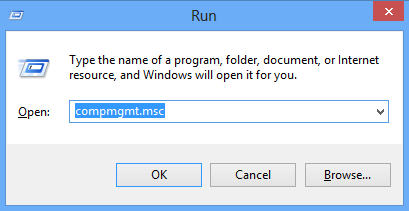
Windows 8, the latest OS from Microsoft comes with many new features and improvements over Windows 7. Run commands are commands in Windows, which allows you to quickly access features and applications which are default in Windows. For example, if you want to access computer management tool in Windows, instead of using the Control panel to open it, you can use the run command compmgmt.msc and open it quickly. These run commands are available for almost all settings available in Windows control panel.
Similar to Windows 7, here is the list of run commands for Windows 8.


21.7.12

Windows 7 SP1 all ISO Download Links


These are now available for those who currently have Microsoft Windows 7 with Genuine Activation Keys. These are the legitimate downloads, full ISO image to burn to a good quality blank DVD using any good image burning program such as ImgBurn or the like.

These ISO image download have Service Pack 1 integrated into the installation setup, so therefore there is no need to separately install SP1 after the initial install of Windows 7.


13.7.12

Windows Server 2012 Beta Essentials With Serial Number


Windows Server 2012 Beta Essentials  is the next generation of Windows Home Server. Microsoft incorporates features previously only found in the Windows Home Server, such as the support for DLNA-compliant media and streaming into the Windows Server 2012 Essentials, and Windows Server 2012 Essentials focus for your business with a server operating system and ideal for small businesses that use at home. Offers intuitive administrative experience, the features storage for storage space with the elastic and resilient data protection for servers and client computers are powerful.
window ႏွင့္ serial key ေဒါင္းေလာ့လင့္ ခြဲတင္ထားပါတယ္...

Updates Via E-Mail

Popular Posts

Labels